

How Credit-Based Logo Makers Work (Quicklogo Budget Guide)
Discover how credit-based pricing transforms logo projects with Quicklogo. Learn to budget accurately and avoid overspending with practical tips.
Quicklogo Team
How Credit-Based Logo Makers Work (Quicklogo Budget Guide)
You need a logo this week, but you don't want to commit to another subscription. Enter credit-based pricing—a growing trend embraced by many companies. Credit-based models, like Quicklogo’s, allow founders to pay only for the actions they take, offering a clear view of value vs. cost. In this post, we'll demystify credit-based pricing by walking you through a real-world logo project. You’ll learn to plan your budget smartly, estimate credits needed, and watch out for potential pitfalls—ensuring you only spend what’s necessary.
Understanding Credit-Based Pricing
Credit-based pricing is a usage-based pricing model where customers purchase credits upfront to access specific actions or features within a service. Think of these credits as digital tokens you use whenever you engage with a feature like generating a logo or downloading a design. It's akin to buying tokens at an arcade—you spend them on the games you want to play.
Why is this model gaining traction? There has been a surge in adoption within SaaS and AI sectors. Many companies are opting for credit-based pricing. Among the adopters are big names like Figma, HubSpot, and Salesforce. Credits have emerged as a standard particularly for AI agents, offering transparent action-based costs over complex token math.
So, what drives companies to embrace credit-based pricing? Here are a few reasons:
Transparency and Predictability: Credits offer a clear value-per-action model. Customers know exactly what each action will cost, which helps in budgeting for a specific task like logo creation.
Flexibility: Use credits as needed without long-term commitments. For a founder needing a logo fast, this means you can pay for only what you need without the burden of a subscription.
Scalability: Businesses of all sizes benefit from credit volume discounts. They might offer credits for a certain price, scaling to larger amounts for a reduced per-credit cost.
Alignment with Consumption: Credits are purchased based on anticipated usage, aligning costs more closely with actual consumption. This is particularly beneficial in the fast-evolving world of AI, where rapid innovation demands adaptable models.
Yet, while credit-based pricing offers numerous advantages, it's crucial to understand potential pitfalls. Opacity, unexpected breakage (unused credits), and over-complexity can confuse users if not managed well. Thus, our goal is to demystify these elements, ensuring your next project is both cost-effective and efficient. For founders seeking a pay-as-you-go approach without extra baggage, tools like Quicklogo offer a promising solution. Always remember to check their website for the most current pricing models and available credit bundles.
Why Credit-Based Models Are Rising

You’ve likely noticed the shift in SaaS to credit-based pricing models. It's a reaction to the need for pricing transparency, offering a clearer alternative to complex token systems. At its core, this model lets you prepurchase credits for specific actions or features rather than dealing with the murky waters of token math. Many companies are moving to this approach. Giants like Figma and Salesforce have taken note and shifted accordingly.
Transparency and Value-Based Pricing
Why the switch? Well, it’s all about aligning costs with action value. Customers today demand a clear understanding of what they’re paying for. Credits give you that: each represents a tangible action, whether it's generating a logo or customizing an existing design. This makes SaaS purchasing decisions much simpler and aligns perfectly with customer expectations of value-based pricing.
Shifting Market Demands
As the market evolves, there’s an increasing push for pricing transparency. Unlike tokens, which can obscure actual spending through varying token values per action, credits offer a direct line between your budget and your activity. This approach is much needed with the rise of AI-powered tools, where tying price to the value of actions makes more sense than ever. Customers can confidently plan and allocate their resources effectively, without fear of unexpected charges.
Why Companies Are Adopting Credits
With companies like Figma and Salesforce leading the charge, credit-based models are becoming a standard due to their predictability and scalability. It’s not just about being transparent—credits support enterprises through scalability, allowing them to adjust their spending as needed. This is particularly appealing in the AI industry, where innovation and rapid development necessitate flexible pricing strategies.
The trend is clear: as you embark on projects like generating a logo with Quicklogo, credits ensure you stay in control financially, only paying for the actions you need without the hassle of subscriptions. This is why many businesses find it worth considering credit systems over traditional models.
How Credit-Based Pricing Works in Logo Makers
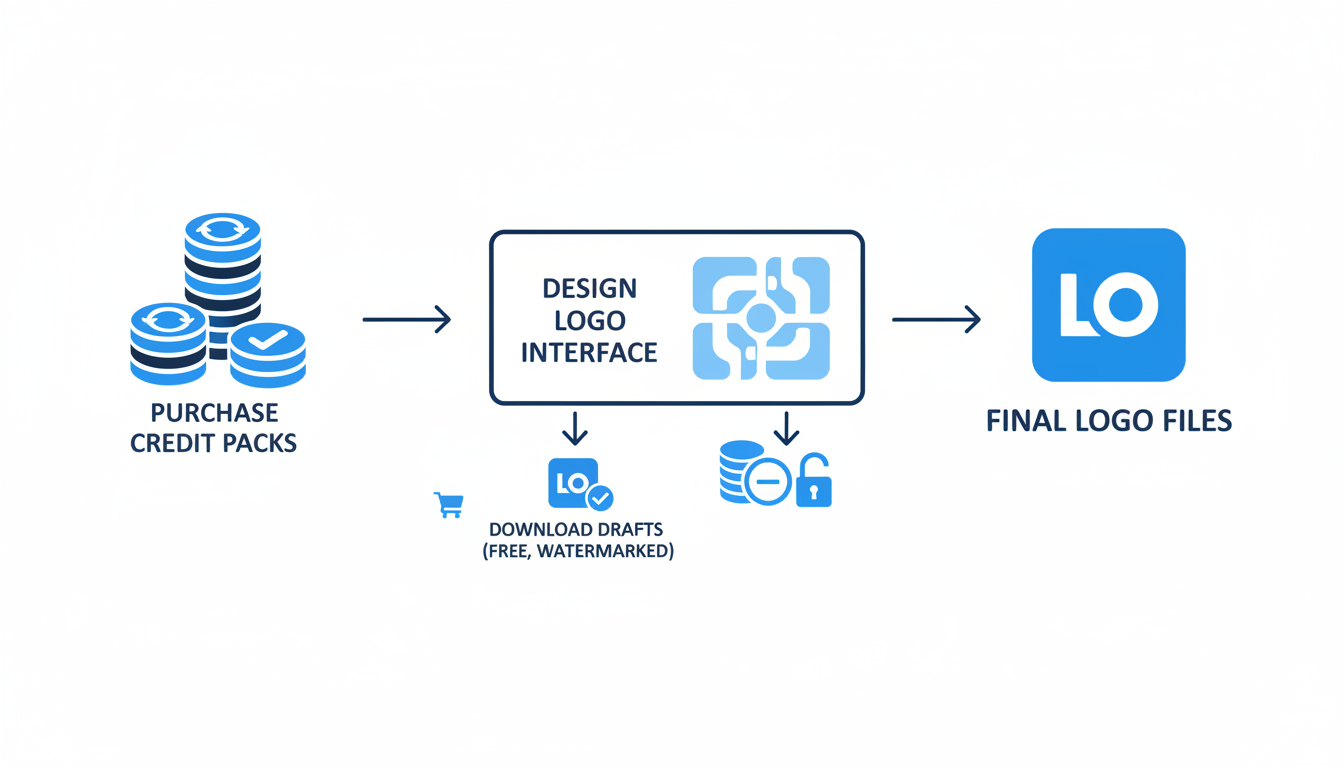
Understanding credit-based pricing can transform how you think about generating a logo, especially for one-off projects. Here's how it breaks down for founders juggling multiple tasks.
1. What Is a 'Credit'?
In the realm of logo makers like Quicklogo, a credit represents a distinct action or feature within the application. Each time you generate a new logo, customize a design, or download a final version, credits come into play. This direct link between credits and actions ensures you know exactly what you’re paying for, offering a level of pricing transparency rarely seen in subscription models.
2. Why Choose Credit-Based Pricing?
For founders aiming to keep costs down, credit-based pricing provides a tangible advantage. Unlike subscriptions where you pay a fixed amount regardless of usage, credits allow for pay-as-you-go pricing. This means you purchase only what you need, making it ideal for one-time tasks like creating a logo for an MVP or marketing campaign. Given its practicality, it’s no surprise that credit pricing is skyrocketing according to Growth Unhinged.
3. Mapping Out Your Logo Project
When starting a logo project, consider the phases: generating options, comparing designs, refining choices, and downloading assets. Typically, you use credits at each stage, and having a clear project plan helps estimate your credit needs, minimizing the risk of over-spending or running out mid-project.
4. Avoiding Potential Pitfalls
Credits enhance pricing transparency by letting you focus on the value each action brings. However, be aware of potential complexities such as breakage (unused credits) and opacity in credit valuation. Doing simple math upfront can prevent these issues, ensuring every credit counts.
Ultimately, embracing a credit system aligns costs with consumption, offering a fair and flexible approach well-suited to the dynamic needs of early-stage founders. For a fast, stress-free logo experience, exploring a tool like Quicklogo, which is built around quick edits and multi-format outputs, is valuable. Be sure to check Quicklogo's website for current pricing and credit bundles to match your project’s needs.
A Step-by-Step Credit Budgeting Tutorial for Logo Projects
When embarking on a logo project using a credit-based pricing model, it's essential to understand how to effectively plan your budget. This approach empowers you to make informed decisions, ensuring you spend credits wisely at each stage. Here’s a founder-friendly walkthrough to manage your logo project within a credit-based framework.
Breaking Down the Logo Creation Phases
To effectively use your credits, break the logo creation process into four distinct phases: generation, comparison, refinement, and download.
Generation: Start by generating multiple logo options using an AI logo generator like Quicklogo. Estimate credits needed based on the number of designs you want to explore. Each generation or iteration will likely cost a set number of credits.
Comparison: After generating various options, compare them carefully. This phase may not directly utilize credits, but it's crucial for making smart choices about which designs move forward.
Refinement: Choose the most promising logo designs for refinement. Use credits to customize aspects like color, typography, and iconography to match your brand aesthetic. This stage involves experimenting with different variations, enhancing the logos’ alignment with your vision.
Download: Once satisfied, download the finalized logo in various formats. This typically consumes additional credits, often varied by file type and resolution.
Estimating Your Credit Budget
A simple estimator can help you budget credits effectively:
| Phase | Action | Typical Credits Needed |
|---|---|---|
| Generation | Create multiple initial logo drafts | 20-50 credits |
| Comparison | Narrow down and select potential designs | 0 credits |
| Refinement | Customize and fine-tune preferred designs | 30-60 credits |
| Download | Download in desired formats | 10-20 credits per format |
Note: Adjust this estimator according to the specific pricing of the tool you’re using, like Quicklogo.
Preventing Overspending: Guardrails and Strategies
Set Clear Goals: Define what you want from your logo before you begin. This focus minimizes unnecessary generations and refinements.
Use Stopping Rules: Establish criteria for moving forward with a particular design—this keeps refinement loops from spiraling.
Monitor Credit Usage: Regularly check your credit balance to avoid surprises. Many SaaS platforms display credit usage in real-time.
Expert Insight: Credits provide clear value-per-action visibility—an advantage over traditional token systems, facilitating more predictable spending.
By planning ahead and using this budgeting framework, you can navigate credit-based pricing effectively, ensuring you get the professional logo you need without overspending. Always remember to refer to the latest pricing and bundles on the Quicklogo website to fine-tune your financial planning.
Credits vs Subscription: What’s Right for Your Project?
When deciding between credits and subscription for your logo creation project, it's essential to consider your project's scope and budget. Let's break down scenarios where credits are more advantageous, compare costs, and build a decision-making framework.
When Credits Make Sense
For founders working on small, one-off projects like a logo for a pitch deck, MVP, or a Shopify store, credit-based pricing is often the better option. This model allows you to pay for specific actions, such as generating and editing logos, without the ongoing financial commitment of a subscription. You buy prepaid credits and use them only when necessary, making it a great choice for tasks that don't require continuous design work.
Comparing Costs
To illustrate, think of credits as an à la carte option while subscriptions resemble an all-you-can-eat buffet. Each has its own costs and benefits:
Credits:
- Cost per Action: You only pay for what you use—ideal for sporadic logo projects.
- Transparency: Every credit used reflects a clear action, supporting financial predictability.
- Volume Discounts: Some providers offer discounts for bulk credit purchases, which can reduce the per-action cost.
Subscription:
- Flat Monthly Fee: Pay a regular fee, suitable for continuous, varied design needs.
- Consistency: Stable billing cycle even if usage fluctuates, which can be cost-effective for ongoing projects.
Decision Framework
Here's a simple framework to help decide what's best for your project:
Evaluate Project Scope:
- One-off or Intermittent Needs: Opt for credits.
- Regular or Ongoing Design: Consider a subscription.
Estimate Usage:
- Determine how many actions (generations, edits) you need.
- Use a credit budget estimator to calculate potential costs.
Budget Constraints:
- If capital is tight, credits can offer more control and reduced upfront commitment.
- For flexible budgets, subscriptions offer predictability over time.
Quicklogo Pay-as-You-Go Model
With Quicklogo, you'll find a streamlined credit system tailored for fast logo projects. This pay-as-you-go model ensures you only invest in what you use, mitigating the risk of unnecessary expenses. To utilize Quicklogo effectively, visit their site for current pricing and credit bundles—allowing you to plan your projects around budget flexibility and precision.
| Feature | Credits | Subscription |
|---|---|---|
| Ideal for | One-time or infrequent projects | Ongoing projects |
| Payment | Prepaid, usage-based | Recurring, flat-rate |
| Cost Transparency | High—pay per action | Moderate—fixed with potential unused capacity |
| Flexibility | High—scale up/down with project | Lower—consistent fee |
| Budget Control | Stringent—costs tied to usage | Predictable monthly cost |
Ultimately, for those needing a sleek, professional logo without prolonging commitments, credits offer an efficient and transparent alternative. Consider your project needs and financial preferences to select the best pricing model for you.
Running a Logo Workflow in Quicklogo
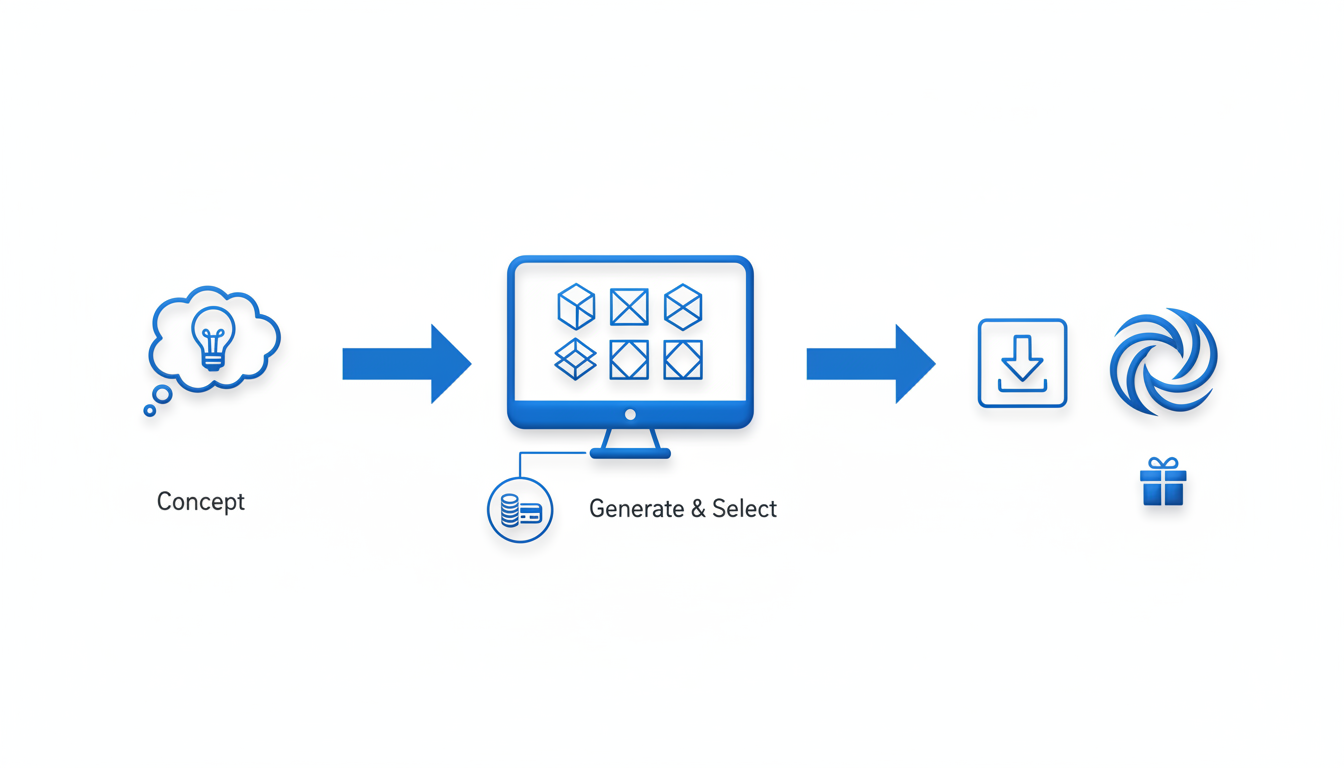
Navigating the Quicklogo workflow can feel like a breeze, especially if you're in a crunch to launch a professional brand presence without getting bogged down by a subscription. Quicklogo operates on a pay-as-you-go model, using AI to generate stunning logos in seconds, providing flexibility and control for founders on a budget.
The Workflow: Generate, Select, Customize, Download
1. Generate
Start by entering a simple description of your business or project, and let Quicklogo’s AI work its magic. Within moments, the system, trained on thousands of professional logos, will present you with multiple tailored options. This quick generation means you can rapidly explore various creative directions without manual design efforts.
2. Select
Once you have a range of logos, the next step is selection. Here, you can compare different styles, layouts, and iconography to decide which logo resonates most with your brand vision. The advantage is the ability to see diverse options instantly, helping you make an informed decision without delay.
3. Customize
Found a logo you like? Great! Quicklogo allows you to refine the design so it perfectly aligns with your brand's aesthetics. You can adapt colors, tweak styling, and adjust design elements with ease. Customization ensures not just a visually striking result, but one that's fully tailored to your needs.
4. Download
After perfecting your logo, downloading it in multiple formats is straightforward. Quicklogo’s speedy delivery means you get files ready for digital and print use, ensuring usability across websites, social media, and promotional materials.
Expert Insight: "Quicklogo’s process is designed for the modern founder — swift, adaptable, and precise. It's a robust tool for urgent brand needs."
The Pay-as-you-go Advantage
With Quicklogo's credit-based system, you only pay for what you use. This provides pricing transparency and avoids the hassle of a recurring subscription, making it ideal for one-off logo projects. Before diving in, it's a good idea to check the Quicklogo website for the latest pricing and credit details.
Speed and Multi-Format Delivery
The combination of speed and versatility lies at the heart of Quicklogo. Whether you're prepping for a pitch, launching a Shopify store, or revamping your app icon, Quicklogo’s output is delivered in various formats, ensuring you’re ready for any medium.
Key Takeaway: Quicklogo empowers founders to quickly create and refine professional logos without being tied down by complex subscriptions or hidden costs.
For founders needing a fast, efficient way to create a professional logo, the Quicklogo workflow offers a seamless path from concept to completion — all without long-term commitments. For more insights on how to get started, explore our step-by-step guide on generating a logo with Quicklogo.
Preventing Wasted Credits and Scope Creep
When you're diving into a logo project with a credit system, it's essential to be savvy about how you use those credits. Here’s how to navigate this and prevent unnecessary costs.
Optimize Credit Usage
Key Insight: Plan your credit usage from the start. Consider the typical lifecycle: generate → compare → refine → download. Allocate credits for each phase, ensuring you reserve enough for the final touches. Start by defining what a "complete logo" means for your project.
- Pre-flight Scoping Checklist: Clearly outline your logo’s purpose. Will it be used on websites, business cards, or social media? Knowing this helps estimate how much you’ll customize.
- Credit Budget Estimator: A simple formula could involve estimating your needs for initial generations (e.g., 10 credits), refinements (e.g., 5 credits), and final formats (e.g., 3 credits). Tailor this based on the complexity of your project.
Avoiding Scope Creep
Key Insight: Scope creep sneaks up when adjustments balloon beyond the initial project vision. To combat this:
- Set Stopping Rules: Decide how many iterations are reasonable. For instance, limit logo variations to five key concepts before narrowing down.
- Phase Guardrails: Define what each phase will achieve. If you’re generating, make it purely exploratory. Refinement phases should focus on polishing, not reinventing ideas.
Watch for Common Pitfalls
Key Insight: Be aware of breakage and over-complexity. It's easy to get caught in an endless cycle of minor tweaks that eat up credits.
- Monitor for Over-Refinement: Ask yourself if each tweak adds significant value. Often, small changes don't drastically improve the brand recognition.
- Opacity in Credit Rules: Ensure you understand your platform’s credit system. Some platforms may have opaque pricing, leading to unexpected deductions. Always check specifics on the Quicklogo site for current details.
Takeaway: By structuring your credit use around clear goals and defined phases, you can efficiently navigate a credit-based pricing environment. This ensures you'll reach the finish line without draining your resource bank—and your nerves.
Common Pitfalls in Credit-Based Pricing Models
Navigating credit-based pricing can be tricky, especially when it comes to potential pitfalls like breakage and opacity. Understanding these issues will help you maintain transparency and optimize your budget.
Breakage refers to the unused credits that remain after a transaction. It’s a common challenge in credit systems, where customers often purchase more credits than they need, leading to leftover credits. To minimize breakage, carefully plan your project phases. Use a credit budget estimator to forecast how many credits you'll need for generating, refining, and downloading your logo. Set a stopping rule to avoid over-purchasing — if you estimate needing 100 credits, avoid buying a bundle of 500 just for a better rate.
Opacity can be another hurdle. Some credit systems lack clear cost breakdowns, making it difficult to understand where your credits are going. To combat this, look for platforms that offer detailed activity logs or dashboards showing credit usage per action. This transparency aids in tracking expenses and ensures you’re spending credits wisely, avoiding unexpected costs or hidden fees.
For those tempted by volume discounts, proceed with a strategy. Platforms may offer scaled discounts when buying in bulk. While appealing, ensure that the discount aligns with your project needs. Overcommitting to larger bundles without a clear project scope can lead to wasted credits, offsetting any discount benefits.
By anticipating these pitfalls and implementing smart strategies, founders can navigate the credit-based landscape effectively, ensuring a cost-efficient and streamlined logo creation process. Consider using tools like Quicklogo, which provide clear credit usage insights and tailored solutions. For up-to-date credit bundles and pricing, always check the Quicklogo website.
Frequently Asked Questions
What is credit-based pricing?
Credit-based pricing allows users to prepay for usage credits, which they then spend on app features or actions.
How do I estimate the number of credits needed for a project?
Use a credit budget estimator to plan for each phase like generating, refining, and downloading logos.
Are credit-based models more cost-effective than subscriptions?
For one-off projects, credits can be more cost-effective as you only pay for what you use.
Can I adjust my credit usage if my project requirements change?
Yes, most platforms allow flexibility, but staying within initial project scopes helps manage costs.
What are some standard pitfalls in using credit-based systems?
Common issues include not estimating correctly, leading to running out of credits before project completion.
Final Thoughts
Credit-based logo makers like Quicklogo offer a flexible, transparent solution for managing smaller, time-boxed projects. They're ideal for entrepreneurs and small businesses who need professional logos without committing to a subscription. By planning your design phases and setting a credit cap, you can optimize your budget and achieve great results.
Consider trying Quicklogo for your next small project, and visit Quicklogo’s website for the latest pricing and credit bundles. For a detailed walkthrough, explore our step-by-step Quicklogo guide to get started quickly.
Back to all posts